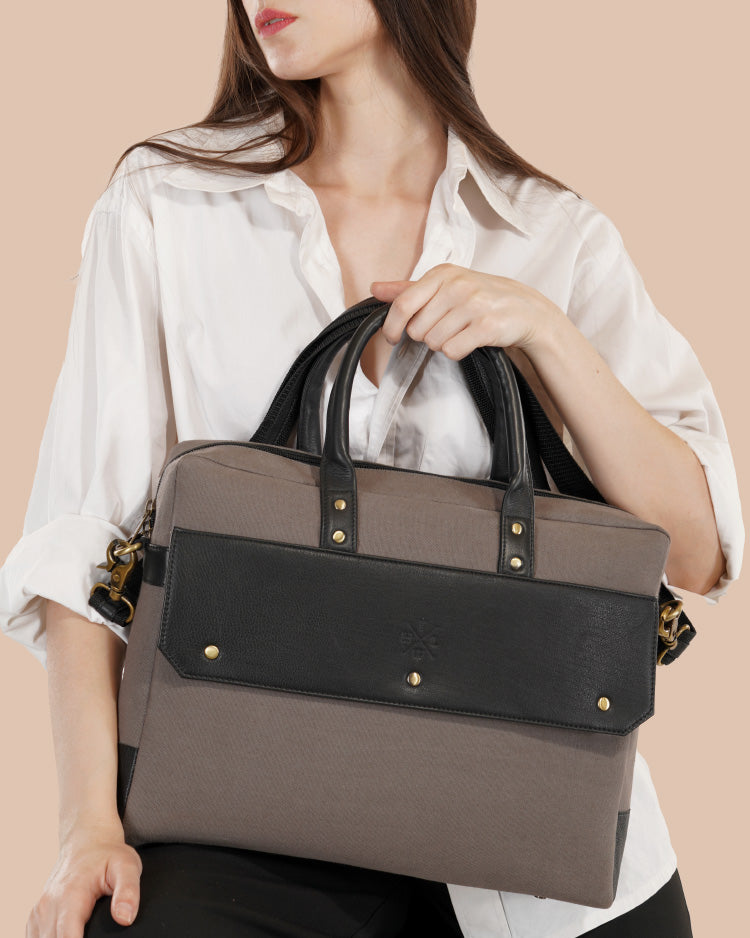
How to Choose the Best Leather Laptop Sleeve in 2027
How to Choose the Leather Laptop Sleeve
Buying a laptop sleeve seems like a simple decision until you start comparing different materials, sizes, designs, and features. Some people need a lightweight sleeve for daily office use, while others want something more durable for business travel or carrying their laptop between different workspaces. Finding the right balance between protection, convenience, and appearance can make a real difference.
A leather laptop sleeve is a popular choice for people who appreciate practical accessories with a timeless design. Leather offers a distinctive texture and can develop more character with regular use. However, the quality of the material, interior padding, stitching, and overall construction should all be considered before making a purchase.
Several brands offer leather laptop accessories with different approaches to craftsmanship and design. For example, Leather Warehouses, Harber London, and Saddleback Leather are among the names buyers may come across when exploring leather products. Comparing different brands and their product features can help you understand what makes a sleeve suitable for your everyday requirements.
Here are the important factors to consider when choosing a leather laptop sleeve.
1. Choose the Right Size for Your Laptop
Size should be your first consideration when buying a laptop sleeve. Even a well-made product may not be useful if your laptop does not fit properly.
Laptop sleeves are available in different sizes, commonly designed for devices ranging from 13 inches to 17 inches. However, screen size alone does not determine whether a sleeve will fit your laptop.
Two laptops with the same screen measurement can have different dimensions because of their design, bezels, and thickness.
Measure Your Laptop Before Buying
Check these three measurements before selecting a sleeve:
- Width: Measure your laptop from left to right.
- Height: Measure the distance from the front edge to the back edge.
- Thickness: Check how thick the laptop is, including any permanent external features.
Compare these measurements with the internal dimensions provided by the manufacturer.
A sleeve should hold your laptop securely without making insertion and removal difficult. If it is too loose, the device may move around inside. If it is too tight, you may struggle to remove it comfortably.
If you use a laptop cover or protective case, include its dimensions when checking the fit.
Readers comparing different styles and materials can explore this leather laptop sleeve to understand the available designs, sizes, and everyday carrying options.
2. Understand Different Types of Leather
Leather quality has a direct influence on the appearance, texture, and overall feel of a laptop sleeve. Since this accessory may be used regularly, choosing the right leather is important.
Different leather types have different characteristics. Understanding them can help you compare products more effectively.
Full-Grain Leather
Full-grain leather retains the natural grain of the hide. It is valued for its natural surface, durability, and ability to develop a patina over time.
Small variations in texture and appearance are normal and contribute to its individual character. People who prefer natural-looking leather accessories often consider this material.
Top-Grain Leather
Top-grain leather has a more refined and consistent surface. Its outer layer is processed to achieve a smoother appearance, making it suitable for people who prefer a polished finish.
It can be a practical option for professional accessories where a clean and uniform look is preferred.
Genuine Leather
Genuine leather is a broad material description used across different leather products. Its quality can vary depending on the hide, processing, and finishing methods.
Do not judge a product only by the word genuine. Examine its construction, surface finish, thickness, and available product information.
Compare Brands and Their Craftsmanship
Looking at how different manufacturers approach leather accessories can provide useful buying insights.
For example, Leather Warehouses offers leather products with an emphasis on handmade craftsmanship and personalization. Harber London is another name buyers may explore for contemporary leather accessories, while Saddleback Leather is known for its rugged leather product designs.
These brands have different styles and product approaches. Comparing their materials, finishing, and construction can help you identify the qualities that matter most to you.
3. Check the Interior Padding and Laptop Protection
A leather exterior does not automatically guarantee good laptop protection. What happens inside the sleeve is equally important.
Your laptop may come into contact with other objects when placed inside a backpack, briefcase, or travel bag. A soft interior lining can help reduce scratches caused by friction.
Why Interior Padding Matters
Padding creates an additional layer between your laptop and the outside environment. It can help reduce the effects of minor knocks during everyday handling.
Before purchasing a sleeve, look for:
- Soft interior lining to protect the laptop's surface.
- Suitable padding around the main compartment.
- Secure edges that help keep the laptop in position.
- Smooth interior materials that do not catch on the device.
Some designs also include reinforced corners for additional cushioning.
Keep in mind that standard laptop sleeves are not necessarily designed to withstand heavy impacts or accidental drops. If you travel frequently, look for a product with suitable protective construction rather than relying only on its leather exterior.
4. Decide Whether You Need a Laptop Sleeve with Handle
Your carrying habits should influence the type of sleeve you choose. Some people prefer placing their laptop inside a backpack, while others regularly carry it separately.
A laptop sleeve with handle can make everyday movement more convenient, particularly for people who travel between offices, meetings, classrooms, and shared workspaces.
Benefits of a Built-In Handle
A handle gives you another way to carry your laptop without holding the entire sleeve against your body.
It can be useful when:
- Moving between different office departments.
- Carrying a laptop into meetings.
- Travelling through airports and railway stations.
- Working from cafes or shared workspaces.
- Carrying your laptop separately from other belongings.
However, a handle may add some bulk to the design. If you normally keep your laptop inside a backpack, a slim sleeve without a handle may be easier to store.
Before selecting a design, compare the available laptop sleeve and pay attention to carrying features, dimensions, and construction.
Check the Handle Construction
A handle should be securely attached to the main body of the sleeve. Examine the stitching and attachment points to make sure they are properly finished.
Also consider the handle's position and grip. An uncomfortable handle can make a sleeve difficult to carry, particularly when the laptop is relatively heavy.
Choose a design that feels balanced when held and does not put unnecessary pressure on your hand.
5. Select a Secure and Convenient Closure
The closure system helps keep your laptop inside the sleeve during movement. It should provide a secure fit while allowing you to access the device without difficulty.
Different designs offer different advantages.
Zipper Closure
Zippered sleeves provide an enclosed compartment that helps prevent the laptop from slipping out.
When comparing zippered designs, check whether the zipper moves smoothly and whether the surrounding stitching is properly finished.
The zipper should not catch on the laptop or damage the interior lining.
Magnetic Closure
Magnetic closures offer quick access and a simple appearance. They can be useful for professionals who frequently remove their laptops during meetings or presentations.
Check whether the magnetic fastening holds the flap securely when the sleeve is carried or tilted.
Fold-Over Closure
Fold-over designs generally have a minimal appearance and fewer hardware components.
They may suit people who prefer simple accessories without unnecessary details. Make sure
the flap provides sufficient coverage and keeps the laptop securely inside.
The best closure depends on how frequently you access your laptop and how you normally carry it.
6. Consider Additional Storage for Everyday Accessories
Most laptop users carry more than just their computers. Chargers, cables, earphones, notebooks, pens, and other small essentials are often part of a daily work routine.
Some leather laptop sleeves include additional compartments to keep these items organized.
What Should You Carry?
Think about the accessories you regularly use before choosing a design.
- Chargers: A separate compartment can help prevent them from pressing against the laptop.
- Charging cables: Small pockets can keep cables organized and reduce tangling.
- Documents: A flat compartment can be useful for carrying papers or notebooks.
- Earphones and USB drives: Small storage sections can make these accessories easier to find.
If you only carry your laptop, a simple single-compartment sleeve may be sufficient.
Avoid choosing a bulky design just because it has more pockets. Additional storage is useful only when it supports your everyday needs.
7. Examine Stitching, Edges, and Overall Construction
The quality of a leather laptop sleeve depends on more than its exterior material. Its construction determines how well the different components work together.
Stitching, edge finishing, hardware, and lining are all important details to inspect.
Important Construction Details
Stitching: Look for consistent stitches without loose threads or uneven spacing.
Edges: The edges should be neatly finished without rough or unfinished areas.
Corners: Check whether the corners are properly constructed and provide enough room for the laptop.
Hardware: Zippers, buttons, and magnetic closures should function smoothly.
Interior lining: The lining should be securely attached and should not have loose fabric or exposed seams.
A well-constructed sleeve should feel balanced and comfortable to use. These small details can influence how well the product performs during regular use.
8. Select a Design That Matches Your Lifestyle
The appearance of your laptop sleeve is a personal choice, but it should also match the situations in which you plan to use it.
A professional who works in a corporate office may prefer a simple design, while someone who travels frequently might need additional storage and a convenient handle.
Minimal Designs for Professional Use
Simple leather sleeves are suitable for people who prefer a clean and polished appearance.
Colours such as black, brown, and tan can complement different office accessories and work bags. They are also relatively easy to coordinate with professional clothing.
Functional Designs for Frequent Travellers
People who regularly travel with their laptops may benefit from sleeves with secure closures, protective padding, and additional compartments.
A lightweight construction is also helpful when carrying a laptop through airports or between different locations.
Personalised Designs for Individual Use
Personalization is another feature worth considering when selecting a leather accessory.
Some manufacturers offer name personalization, initials, or logo customization. These details can make an everyday accessory feel more personal without changing its practical purpose.
For example, Leather Warehouses offers free name personalization of up to 8 characters on eligible products. Brand logo personalization is also available for an additional charge.
This type of customization can be useful for individual buyers, professional gifts, and businesses looking for coordinated accessories.
9. Understand Leather Care and Maintenance
Leather is a durable material, but it still requires suitable care to maintain its appearance.
Exposure to moisture, direct sunlight, dust, and rough handling can affect the leather's finish over time.
A few simple habits can help keep your laptop sleeve in good condition.
Clean It Regularly
Use a soft, dry cloth to remove dust and everyday dirt. For stains, follow the cleaning instructions recommended for the specific leather finish.
Avoid using household cleaning products or excessive water because they may affect the material.
Keep It Away From Excessive Moisture
If your sleeve gets wet, gently remove the surface moisture with a clean cloth.
Allow it to dry naturally at room temperature. Avoid placing it near heaters or using a hairdryer because excessive heat can affect the leather's texture.
Store It Properly
When not in use, keep the sleeve in a cool and dry place.
Avoid placing heavy objects on top of it, as prolonged pressure may affect its shape. A breathable fabric storage bag can also help protect it from dust.
Following these simple steps can help maintain the appearance of a quality leather accessory.
10. Compare Price With Long-Term Value
Price is an important consideration, but the least expensive option may not always be the most suitable.
A laptop sleeve is an accessory you may use several times a week. Its material quality, construction, protective features, and convenience should all be considered when comparing products.
Before making a decision, ask yourself:
- Is the leather quality suitable for regular use?
- Does the interior provide enough protection?
- Are the stitching and finishing consistent?
- Does the sleeve fit my laptop correctly?
- Is the handle comfortable and practical?
- Does it have the storage space I actually need?
- Is the design suitable for my daily routine?
A slightly higher initial cost may be reasonable if the sleeve offers better materials and construction. However, an expensive product is not automatically a better choice.
Compare the actual features rather than relying only on brand reputation or appearance.
Conclusion
Choosing the best leather laptop sleeve involves understanding your everyday requirements and comparing the features that matter most.
Start with the correct laptop size and leather quality. Then examine the interior padding, stitching, closure system, and available storage. If you regularly carry your laptop separately, a laptop sleeve with handle may offer additional convenience. If you usually place it inside a backpack, a slim design may be more practical.
Exploring different brands, including Leather Warehouses, Harber London, and Saddleback Leather, can also help you understand the range of designs and craftsmanship available in the market.
Ultimately, the right choice is not necessarily the most expensive or the most stylish option. It is the one that provides a comfortable fit, suitable protection, and practical features that support the way you work and travel.
Frequently Asked Questions
Q1. How do I choose the correct size for a leather laptop sleeve?
Measure your laptop's width, height, and thickness before purchasing. Compare these dimensions with the sleeve's internal measurements. Do not rely only on the screen size because laptops with the same screen measurement can have different physical dimensions.
Q2. Is a leather laptop sleeve suitable for everyday office use?
Yes. A properly constructed leather laptop sleeve can be suitable for daily office use, commuting, and business travel. Choose one with a soft interior lining, a secure closure, and appropriate padding for everyday protection.
Q3. Should I buy a laptop sleeve with a handle or without one?
A laptop sleeve with handle is useful if you frequently carry your laptop separately between meetings, offices, or workspaces. A handle-free design is generally more convenient if you normally place your sleeve inside a backpack or briefcase.
Q4. Does a leather laptop sleeve protect against accidental drops?
A leather sleeve with suitable padding can help reduce damage from minor knocks and everyday contact. However, it does not guarantee protection against heavy impacts or accidental drops. Look for reinforced corners and additional cushioning if protection is a priority.
Q5. Can I personalize a leather laptop sleeve?
Yes. Some brands offer personalization options such as names, initials, and company logos. For example, Leather Warehouses offers free name personalization of up to 8 characters on eligible products, while logo personalization is available for an additional charge.