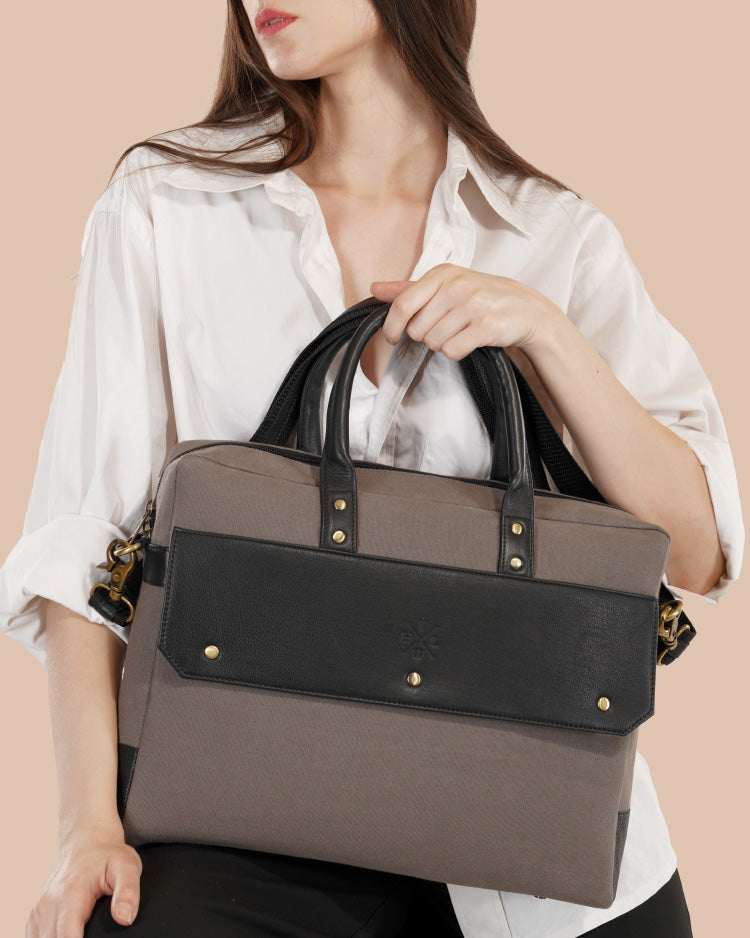
15.6 Leather Laptop Sleeve: What to Consider Before Buying
A 15.6-inch laptop is useful for office work, online meetings, studies, and business travel. However, carrying it from one place to another without suitable protection can leave the device exposed to scratches, dust, and minor bumps. A well-fitted sleeve helps create a protective layer around your laptop while making it easier to carry.
A 15.6 leather laptop sleeve is worth considering if you want a practical accessory with a distinctive appearance. Leather offers a natural texture and can complement both professional and casual settings. The right sleeve should also fit your device properly, provide enough cushioning for everyday handling, and suit the way you travel.
Before choosing a laptop sleeve, it is important to look beyond its appearance. Material quality, internal dimensions, closure design, padding, and everyday convenience all affect how well it meets your needs.
In this guide, we will cover the key factors to consider before buying a leather laptop sleeve for a 15.6-inch laptop.
1. Check the Laptop Sleeve Size Carefully
The first thing to consider is the fit. Although your laptop may be advertised as a 15.6-inch model, its actual dimensions can vary depending on the manufacturer and design.
The 15.6-inch measurement usually refers to the screen's diagonal size rather than the complete width or height of the device. This means two laptops with the same screen size may not fit the same sleeve equally well.
Before placing an order, measure your laptop's width, height, and thickness.Check the sleeve's inside measurements to make sure your laptop fits properly.
A properly fitted sleeve should let you slide your laptop in and out without difficulty. One that is too loose can allow the device to move around inside.
Look for these details when checking the fit:
- Internal dimensions: Confirm that the available space accommodates your laptop.
- Laptop thickness: Make sure the sleeve can close without putting pressure on the device.
- Corner space: Check whether the design allows enough room for the laptop's edges.
- Closure clearance: Ensure that zippers or flaps do not press against the laptop.
If you use a laptop with an unusually thick body or a protective case, check compatibility before buying.
2. Understand the Leather Quality
Leather quality can influence a sleeve's texture, appearance, flexibility, and long-term performance. Knowing the type of leather used can help you choose a sleeve that suits your needs.
Full-Grain Leather
This leather keeps its original grain pattern, including natural marks and texture variations.
It may show natural markings and develop a patina as it ages. This makes it a suitable option for buyers who appreciate natural variations in leather.
Top-Grain Leather
Top-grain leather has a more refined surface and may receive additional finishing. It often has a more consistent appearance, which can appeal to people who prefer a uniform look.
Genuine Leather
Genuine leather is a broad market term rather than a precise quality grade. A product described as genuine leather may differ from another in thickness, finishing, construction, and overall performance.
When comparing leather laptop sleeves, read the material description carefully. Look for clear information about the leather type and finish instead of relying on the product title alone.
Also consider the leather's thickness and flexibility. A sleeve should be easy to use without feeling so loose that it fails to hold the laptop securely.
3. Look for Suitable Internal Protection
Leather provides an outer covering, but it does not automatically protect a laptop from every type of damage. The sleeve's internal construction is just as important as its exterior material.
A good design should help protect the laptop from everyday scratches and minor contact with other objects. Padding or a soft lining can provide an additional layer between the device and the outer material.
Before buying a 15.6 leather laptop sleeve, check whether it includes:
- Suitable padding to help absorb minor impacts.
- Smooth internal seams that will not rub against the laptop.
If you frequently commute by public transport or carry your laptop in a larger bag, additional cushioning may be particularly useful.
Keep in mind that a sleeve is not a substitute for a protective laptop case designed to withstand significant drops. Avoid placing heavy objects on top of the sleeve, and handle your laptop carefully even when it is covered.
4. Choose a Closure That Suits Your Routine
The closure affects how easily you can access your laptop and how securely it stays inside the sleeve.
Different designs suit different preferences.Laptop sleeves come with different closure styles, including zippers, flaps, and magnetic fastenings. Choose one that keeps your laptop secure and allows easy access.
Each design has practical considerations.
Zipper closure: A zipper can help keep the laptop enclosed during travel. Check that it moves smoothly and that its edges do not scratch the device.
Flap closure: A flap can provide convenient access and a clean exterior. Make sure it closes securely and does not leave the laptop exposed.
Magnetic closure: This design can be convenient for frequent access, but check how firmly it holds the sleeve closed.
Choose a closure that feels easy to operate and works with your daily habits. If you often remove your laptop during meetings, quick access may be a priority. If you carry it inside a backpack or travel bag, secure closure may matter more.
5. Consider the Sleeve's Weight and Portability
The sleeve's weight is worth considering, especially if you carry your laptop throughout the day. . A sleeve should provide useful protection without making your bag unnecessarily heavy.
Leather sleeves vary in weight depending on the material, thickness, lining, padding, and hardware. A thick, heavily padded design may provide more cushioning but could take up additional space.
Consider your daily travel routine before choosing a sleeve.
If you carry it between home, the office, and meetings, a slim sleeve may be convenient. It can slide into a backpack, tote, or briefcase without occupying too much room.
If you often carry your laptop on its own, consider whether the sleeve has a handle or another carrying feature. Not every sleeve includes one, so check the product specifications before purchasing.
A slim profile can also be useful for people who prefer a simple work setup. However, do not sacrifice the fit or required protection simply to choose the thinnest option.
6. Decide Whether You Need Extra Storage
Most laptop sleeves focus on carrying the device, although some designs include extra pockets for accessories. . Some designs also include pockets for small accessories, while others focus on keeping the exterior slim.
Think about what you need to carry alongside your device.
If you regularly use a charging cable, a mouse, a notebook, or a few documents, an additional pocket may be helpful. It can keep small essentials together and make them easier to locate.
However, carrying too many items inside a slim sleeve can create pressure against the laptop. Chargers and other hard accessories should not be placed where they can press directly against the screen or body.
If you carry only your laptop, a single-compartment sleeve can meet your everyday needs. If you carry several work essentials, a separate laptop bag with dedicated compartments may be a better option.
Before buying, check the pocket dimensions and the manufacturer's guidance about what the sleeve can accommodate.
7. Pick a Design That Fits Your Professional Style
A leather laptop sleeve can be a useful work accessory as well as a way to carry your device. Its color, finish, and shape can complement your office essentials.
Black leather offers a clean look that works well with formal business accessories. Brown and tan shades provide a different appearance and can pair well with neutral clothing and leather office accessories.
The finish also makes a difference. Some buyers prefer natural grain and visible variations, while others choose a more uniform surface.
Choose a sleeve based on your daily activities and the places you usually take your laptop.
- For office use: Choose a sleeve with a neat shape and a secure closure.
- For business meetings: A simple design can fit comfortably alongside a portfolio or briefcase.
- For college or study: Prioritize easy access, a suitable fit, and enough protection for everyday travel.
- Choose a lightweight sleeve with suitable padding to help protect your laptop while travelling.
- For personal use: Choose a color and finish that match your preferences.
The best design is one that fits your routine rather than one chosen only for its appearance.
8. Check the Stitching, Edges, and Hardware

Small construction details can make a noticeable difference in how a laptop sleeve performs over time.
Inspect the stitching around the edges and corners. Stitches should appear consistent, with no obvious loose threads or unfinished sections. The edges should also be finished neatly to help maintain the sleeve's shape.
If the sleeve includes a zipper, check its movement and attachment. For a flap design, examine the fastening and how the flap sits when closed.
Other details to review include:
- The quality of the inner lining.
- The consistency of the leather finish.
- The strength of the seams.
- The smoothness of the closure.
- The overall shape when the sleeve is empty.
Product photographs can help you assess these features, but clear specifications and customer reviews can provide additional information.
A carefully constructed sleeve should accommodate normal daily handling. Even so, its lifespan depends on the material, frequency of use, storage conditions, and care.
9. Consider Personalization Options
A personalized leather laptop sleeve can add an individual touch to an everyday accessory. Depending on the product, customization may include a name, initials, or company logo.
Personalization can be useful if you want to distinguish your sleeve from similar items in a shared office, coworking space, or meeting room. It can also make a thoughtful gift for a colleague, graduate, business owner, or employee.
Companies can order personalized laptop sleeves for staff gifts, business meetings, trade shows, and promotional activities.
Before ordering a personalized sleeve, confirm the following details:
- Whether name or initials embossing is available.
- The placement and size of the personalization.
- Any character limits.
- Whether logo branding is offered.
- Any additional customization charges.
- The estimated production and shipping time.
Personalization options vary by product, so check the specific listing rather than assuming every leather sleeve supports the same features.
Leather Warehouses offers leather accessories designed to complement your work routine and daily needs. If you are considering a customized laptop sleeve, review the product details to confirm its available sizes and personalization options.
10. Learn How to Care for Your Leather Laptop Sleeve
Regular maintenance helps keep a leather sleeve in good condition. The right care routine depends on the leather type and finish, so always follow the manufacturer's instructions.
Start by wiping away surface dust with a soft, dry cloth. If the sleeve gets wet, blot the moisture gently and allow it to dry naturally in a well-ventilated area.
Keep the leather away from excess moisture and clean it with products recommended for its specific finish. Direct heat and prolonged sunlight can dry the material or affect its color.
You should also avoid storing the sleeve in a damp place. When it is not in use, keep it in a cool, dry location away from sharp objects that could scratch the surface.
If you use a leather conditioner, check that it is suitable for the specific finish and test it on a hidden area first.
A few simple habits can help maintain the sleeve's appearance:
- Remove dust regularly.
- Keep sharp objects away from the leather.
- Avoid overfilling the sleeve.
- Store it away from excessive heat and moisture.
- Follow the recommended cleaning instructions.
Good care cannot prevent every mark or sign of wear, but it can help preserve the sleeve's appearance with regular use.
11. Compare Price With Practical Features
Price is another important factor when buying a 15.6 leather laptop sleeve. However, the least expensive option may not offer the fit, material details, or construction you need.
Consider the material, construction, and useful features alongside the price before making your choice.
Check the leather type, internal lining, padding, closure, stitching, and dimensions. Consider whether the sleeve has extra features that you will actually use.
For example, a slim sleeve may be a sensible choice if you already own a backpack with sufficient storage. A more structured design may be worth considering if you carry the laptop separately and want a firmer exterior.
Read the return policy before ordering, especially when shopping online. Confirm whether returns or exchanges are permitted if the sleeve does not fit your laptop.
A little research before purchase can help you avoid choosing a sleeve that looks good but does not meet your practical needs.
Bulk Orders for Leather Laptop Sleeves
Need leather laptop sleeves in bulk for corporate gifts, employee welcome kits, or business events? Leather Warehouses offers customization options to suit your business needs. Contact us via WhatsApp or email to discuss bulk pricing, personalization, and order details.
Conclusion
A 15.6 leather laptop sleeve can be a useful choice for professionals, students, and anyone who carries a laptop regularly. It combines a leather exterior with a compact design that can help protect the device from scratches and everyday contact.
Before buying, check the laptop's actual dimensions, the leather type, internal padding, closure, stitching, and storage features. Consider how you travel and whether personalization would make the sleeve more suitable for your needs.
The right choice should fit your laptop securely, work with your daily routine, and offer the features you value most.
Explore the laptop sleeve options at Leather Warehouses to find a design that suits your device, work essentials, and personal style.
FAQ
1. Will a 15.6-inch laptop fit in every 15.6 laptop sleeve?
No. Laptop dimensions vary between manufacturers and models. Measure your device's width, height, and thickness, then compare them with the sleeve's internal measurements before purchasing.
2. Which leather is best for a 15.6 laptop sleeve?
Full-grain leather is known for retaining its natural grain, while top-grain leather often has a more uniform finish. The best option depends on your preferences, budget, and the quality of the product's construction.
3. Can I carry a charger inside a leather laptop sleeve?
Only if the sleeve has a suitable separate compartment. Avoid placing a bulky charger directly against the laptop because it may create pressure on the device, especially during travel.
4. Can I personalize a leather laptop sleeve?
Some products offer name embossing, initials, or logo customization. Availability, placement, character limits, and additional charges depend on the specific design.
5. How do I clean a leather laptop sleeve?
Use a soft, dry cloth to remove dust and blot moisture gently. Avoid soaking the leather, applying harsh cleaners, or drying it with direct heat. Follow the manufacturer's care instructions for the particular leather finish.
5. Is a leather laptop sleeve better than a regular laptop case?
The choice depends on your needs. A slim leather sleeve can be convenient for carrying a laptop inside another bag, while a structured or heavily padded laptop case may provide additional protection or storage. Compare the fit, padding, and intended use before choosing.
6. What should I check before buying a 15.6 leather laptop sleeve online?
Check the internal dimensions, leather type, lining, padding, closure, stitching, product photographs, return policy, and care instructions. If you need personalization, confirm the available options and any extra costs before ordering.